

Free demo
Industry guide
What the SRA, the Bar Standards Board and the courts have said about AI in professional work
Download the professional services guide (PDF, 13 pages)Industry guide
The CQC's eleven principles for AI, and where software meets the regulations it enforces
Download the care services guide (PDF, 13 pages)Industry guide
When a tool needs an algorithmic transparency record, and why to draft it before launch
Download the public sector guide (PDF, 13 pages)Useful AI starts with sound judgement.
What we do
Make data protection part of everyday AI use.
Uploading a document, enabling a connector or sharing a chatbot can expose information beyond its intended audience. Staff and developers need to understand these risks before they choose a tool or paste in a record.
We teach practical UK GDPR and AI data-handling principles through workplace scenarios: lawful purpose, minimum necessary data, access, retention, transparency and escalation. We help translate your approved policies into instructions people can follow. Your data protection lead and advisers decide the legal position and approve changes.
Rules people can apply in the moment
Work through what may be shared, who may access it, how output is checked and what happens when something goes wrong.

AI acceptable-use policy
Write a short policy in plain language: which AI tools are approved, under which accounts, for which tasks, and what never goes into any of them. Brief each team on it, and give new starters a version of their own.
- An approved-tool register: tool, account type, permitted tasks and owner
- Rules on personal logins, browser extensions and plug-ins
- Decisions about people where AI may assist but not decide, with the Equality Act 2010 in view
- A version for new starters and a briefing for each team
Data classification for AI
Sort your information into red, amber and green for AI use, and set an approved route for each class. Mark personal, special-category, client-confidential and privileged data so staff can place a document before they paste it.
- Special-category data under UK GDPR Article 9, such as health and care records
- Client-confidential and legally privileged material
- OFFICIAL and OFFICIAL-SENSITIVE handling under the Government Security Classifications, for public bodies that use them
- What a prompt, a file upload, a connector and a plug-in each expose
- Prompt injection, from the OWASP Top 10 for LLM Applications, including instructions hidden in the documents and pages a tool reads
Verification and citation checks
Train staff to check AI output against its source before anyone relies on it. Work through the High Court's June 2025 judgment in Ayinde and Al-Haroun, including the solicitor who relied on his client's research without checking it, then set a checking routine for each kind of output your team produces.
- What 'checked' means for a citation, a figure, a quotation, a summary and a draft letter
- Tracing each statement in an output back to the document it came from
- The SRA warning notice test for case law put before a court: genuine, relevant, with a verifiable citation, and advancing the argument it is cited for
- Exercises built from your team's own documents, on copies with names and personal data removed
- A written checking routine for each type of output
AI incident reporting
Practise reporting a wrong output, an unexpected disclosure or a suspicious prompt to the right person. The organisation assesses whether a personal data breach is notifiable; not every AI mistake requires a report to the ICO.
- A clear internal reporting route
- Record what happened and which information was affected
- Escalate promptly so the organisation can assess its reporting duties
- A notifiable breach must be reported without undue delay and within 72 hours of awareness
- Record the assessment and follow-up actions
AI use records
Agree what is recorded when AI contributes to a decision or a client document, who reviews the record and how long it is kept. Fit the record to the duties you already carry, from data protection impact assessments to the safeguards on solely automated decisions.
- Record fields: tool, version, task, reviewer, date and outcome
- A retention period set against your existing retention schedule
- Triggers for a data protection impact assessment under UK GDPR Article 35 before a new AI use
- A record of human review wherever a decision about a person could otherwise be solely automated
- A record template for the systems you already use
Disclosure wording
Draft the wording that tells clients, patients or residents when AI was used in work for them and who checked it. Match each version to its audience and to what your regulator has published.
- Versions for letters, reports, websites and privacy notices
- Notices for chatbots and automated replies, where people deal with AI directly
- For care providers in England, the CQC's transparency and choice principle, including non-digital routes to care where they are needed
- Algorithmic Transparency Recording Standard records, for public bodies in its scope
- Privacy information for significant decisions based solely on automated processing, under the UK GDPR as amended by the Data (Use and Access) Act 2025
Data protection for AI developers
Follow personal data through an AI feature, from the prompt and knowledge source to logs, suppliers and outputs.
- Map data flows and identify who processes the information
- Use sample data in development and minimise production data
- Test access boundaries and avoid secrets in prompts and logs
- Discuss retention, deletion and supplier terms with the data protection lead
- Identify high-risk uses for DPIA assessment before launch
Responsible oversight at work
Agree what managers need to know about AI use and explain the arrangements to staff.
- Define the purpose and consider less intrusive reporting
- Decide access, retention and the information staff receive
- Separate learning and quality review from assumptions about performance
- Refer monitoring proposals to your HR and data protection advisers
What you get
What changes once the rules are in use
- Every member of staff has one page saying which information may go into which AI tool, and under which account.
- Check AI output against its source before it reaches a client, a court, a patient or a resident.
- When AI has contributed to a decision or a client document, the record shows the tool, the version, who reviewed it and when.
The options
Before information goes into AI
A training aid for applying your own approved policy. Removing a name does not automatically make information anonymous.
| Example | What to practise | |
|---|---|---|
| Public or sample | Published information or genuinely synthetic exercise data | Check accuracy, sources and whether the tool is approved. |
| Business confidential | Internal plans, pricing or client material | Check authority, supplier terms, access and the approved account. |
| Personal or sensitive | Information about identifiable people, including health information | Use only an approved purpose and route; involve the data protection lead where needed. |
| Secrets or unknown | Passwords, API keys or an unclassified file | Keep secrets out of prompts. Stop and ask the information owner before using an unknown file. |
This aid does not decide whether a particular use is lawful. Your policies and specialist review determine what may be processed.
How it runs
Turning public rules into house rules
- 01
Gather the obligations
Collect the rules that already apply to you: data protection law, your regulator's published guidance, client contract terms and your own policies. List the AI tools staff use today, including any used on personal accounts.
- 02
Work through your own cases
Take tasks from each team and decide together which class of information each involves, which tool is allowed and which check applies. Disagreements go to the named owner for a decision.
- 03
Write the documents
Draft the policy, the traffic light, the checking routines, the reporting route and the record template in your organisation's terms. Your data protection lead and advisers review them before they are issued.
- 04
Train the staff
Run sessions on the finished rules, with exercises built from each team's own work. Give every member of staff the one-page version and show them where to report a slip.
- 05
Review the log
Read the incident log and the use records after the first period of use, and change the rules where they do not fit the work.
Read and try
Read the research. Open the demo.
Brief
What never goes in the prompt: rules for using AI at work
A short brief for team leads and data protection leads writing rules for staff use of AI: data classes, what 'checked' means and what to record, with the ICO's guidance on AI and data protection, the SRA warning notice, the CQC's principles and the High Court's judgment on invented citations. It is not legal advice.
Download the brief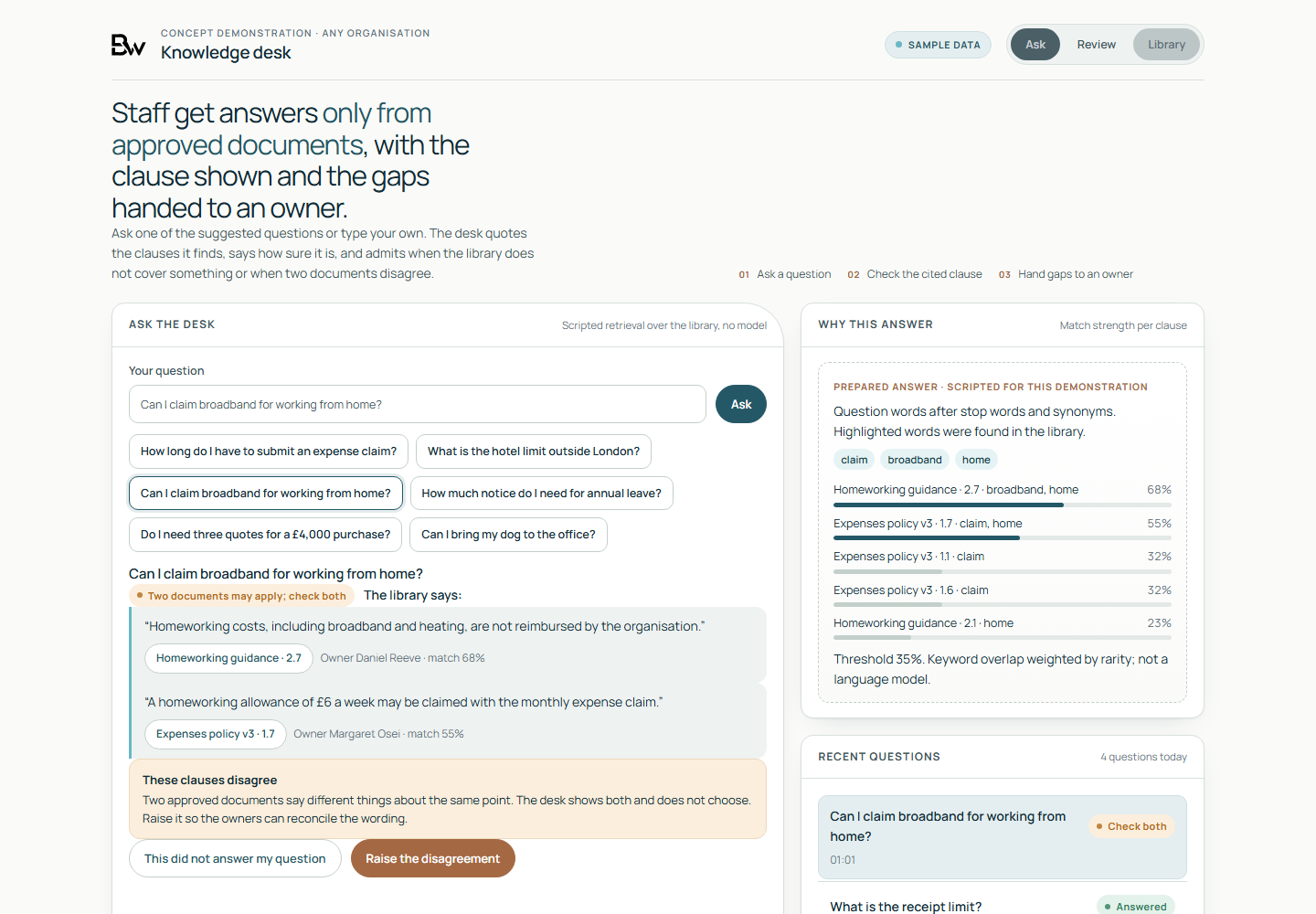
Working demo, on sample data
- A staff policy question answered only from a library of sample documents, with the clause quoted word for word and the document it came from.
- A plain label set by how closely the question matches the library: found in one document, two that may apply, or not covered.
- A disagreement between two documents shown, left unresolved and raised for the document owner to decide.
Worth asking first
- Could a member of staff say, without looking it up, whether a client letter may go into your AI tool?
- What has already gone into an AI tool that should not have?
- Who checks an AI-assisted document against its source before it goes out, and where is that recorded?
- If a client, patient or resident asked how AI was used in work for them, what could you show them?
- Who decides whether information pasted into an AI tool is a personal data breach to report to the ICO?
Talk to us if
- People use unapproved AI tools or accounts for business work.
- You want staff to understand what information they may share with AI.
- Developers are adding chatbots, knowledge sources or connectors.
- Managers are considering AI usage reports or staff activity monitoring.
Questions
Questions buyers ask
Does this make us GDPR compliant?
Training is one part of an organisation's responsibilities. It helps people apply approved rules and recognise risk; it is not a compliance audit, certification or a guarantee.
Is this legal advice?
No. We teach practical methods using your policies and public guidance. Your solicitor, data protection officer or other advisers review legal decisions and policy changes.
Do business accounts make any data safe to upload?
No. The purpose, information, contract, settings and access still matter. A paid account alone is not permission to process personal or confidential information.
Can owners see what staff do with AI?
Reporting depends on the platform and the agreed setup. Before enabling staff activity reporting, define a lawful purpose, what is necessary and proportionate, who can see it and what staff are told. We do not treat monitoring as an automatic benefit of a chatbot.
Where does the guidance come from?
The curriculum uses the ICO's AI and data protection guidance, monitoring-workers guidance and breach-reporting guidance, alongside your own policies. Requirements specific to your industry or jurisdiction are checked with your advisers.
Guidance behind the training
Every member of staff gets the rules on one page.
We start from the obligations you already have and the tools your staff already use, and write the rules with the people who will follow them.
Discuss a responsible AI session