

Free demo
Working demo
Requests routed and prioritised by written rules, against a service standard you can see
Open the Service Desk demoIndustry guide
What the accessibility monitoring found on public sector websites, and what stayed unfixed at retest
Download the public sector guide (PDF, 13 pages)Industry guide
Electronic VAT invoicing, announced for April 2029, and the order and finance systems it reaches
Download the retail and wholesale guide (PDF, 13 pages)A live system looks maintained until somebody checks what it still depends on.
What we do
Live software needs an owner, a patch record and a release route.
If the developer who built your system has left, or the hosting account or domain is registered to someone outside your organisation, nobody inside it owns the system. If the changes your team asks for sit unmade for months, the system has stopped changing with the work. The Cyber Essentials requirements note that vulnerabilities are regularly discovered in all sorts of software, and require an organisation seeking certification to install an update that fixes a critical or high-risk vulnerability within 14 days of its release.
We take on software we build and software another supplier built. Anything built elsewhere starts with a takeover review of the code, hosting, access and dependencies.
From there we maintain the system to written terms: security fixes tracked against the Cyber Essentials window, backups restored on a schedule to test them, every release through staging with a rollback route, and, where you retain it, development time for the changes your team asks for.
Support runs in business hours, and the code, hosting and documentation stay in your accounts throughout.
Three time limits after go-live
Cyber Essentials sets the 14 days for organisations seeking certification: it asks for updates to be applied as soon as possible and treats 14 days as the longest reasonable period. It counts libraries and interpreters as software, but puts bespoke and custom components of web applications out of scope. The Software Security Code of Practice is voluntary and addressed to software vendors. The 72 hours applies only to breaches likely to result in a risk to people's rights and freedoms, and a later report must give reasons for the delay. Whether a breach is reported is a decision for you and your advisers.
Services for software already in use
Each service applies to software we build and to software we take over from another supplier or developer. The engagement shapes further down show how they combine.

System takeover review
Take on software built by another supplier or a departing developer. Review the code, hosting, access and dependencies, list what is out of support, and rank what to fix first. This is a review of design, code and configuration, not a penetration test.
Includes
- Code repositories, hosting, domain and DNS accounts moved into your organisation's name
- Credential rotation, starting with admin and deployment accounts
- A dependency scan, with each runtime and framework listed against its end-of-support date
- A test deployment from the existing documentation by someone other than its author
- A ranked risk register and a handover checklist

Retained development
Reserve development time for the changes your team asks for. Prioritise them with us in a shared backlog, and release them on a set cycle through the same staging and tests as every other change.
Includes
- A shared backlog with an estimate against each item
- New forms, fields, reports, workflow steps and connections to your other systems
- Changes a rule or standard calls for, such as accessibility fixes to WCAG 2.2 AA or a new invoice format
- A written note of what shipped, what is next and how the time was used
- A written rule for time that goes unused

Security and dependency maintenance
Scan every repository we maintain for vulnerable components and apply security fixes to frameworks, libraries and runtimes. Track each critical and high-risk fix against the 14 days Cyber Essentials v3.3 sets, and record the date it shipped.
Includes
- Automated dependency scanning on every repository
- A software bill of materials for each system, in SPDX or CycloneDX format
- A record of each fix: component, CVSS v3 score, release date and date applied
- End-of-support dates for each runtime, framework and database, with a replacement plan before each date
- A vulnerability disclosure route published as a security.txt file (RFC 9116)

Monitoring, backups and restore tests
Watch errors, uptime and scheduled jobs on the systems we maintain, and back them up to a separate account. Restore a backup on a schedule to test it. Alerts are read and acted on in support hours, not around the clock.
Includes
- Error, uptime and failed-job alerts for each system
- Backups held in an account separate from the live system
- Scheduled restore tests, each timed and written up
- The recovery point and recovery time each system supports, written down and measured in each restore test
- A review of hosting costs against usage

Release management
Ship every change through a staging environment, automated tests and a release note, with a rollback route for each release. Restrict access to the build pipeline, and control and log changes to it, in line with principles 2.1 and 2.2 of the Software Security Code of Practice.
Includes
- A staging environment built from the same configuration as production
- Automated tests that run before any change can merge
- Release notes written for the people who use the system
- A tested rollback route for every release
- A change log kept in your repository

Business-hours support
Report faults through one route, and have each one graded against severity definitions written with you, each with its own response target. Support runs in business hours: this is not a 24/7 service, and the contract states what happens out of hours.
Includes
- One reporting route, with every fault logged and visible to you
- Severity definitions from system down to cosmetic, each with a response target
- A written out-of-hours position
- A cause-and-fix note after each serious fault
- Processor terms under UK GDPR Article 28, including notice to you of a breach under Article 33(2)
What you get
What maintenance leaves on the record
- Every runtime, framework and database in each system has an end-of-support date on record, past or future.
- Trace every change, security fix and restore test to a dated record.
- Whoever maintains the system next starts with the backlog, the runbook, the credential list and the state of every dependency.
Ways to work
Takeover, maintenance or retained development
Maintenance and support, and retained development, are each written into a contract that sets the support hours, the response targets and the notice period before work starts. In all three, the code sits in a repository your organisation controls, the hosting in its cloud account and the documentation with the code; for software built elsewhere, the takeover review moves them there.
System takeover review
Review software you rely on before anyone commits to maintaining it. The review ends with a ranked list of what to fix first and a recommendation on the next step, which may be to rebuild, to buy a product or to stay with the current supplier.
- Code, hosting, access and dependency review
- Accounts moved into your organisation's name
- Credential rotation on handover
- Components past or near end of support, with their dates
- A ranked risk register and a handover checklist
Maintenance and support
Keep the system maintained and updated, without new feature work. Security fixes, backups and faults are handled to the terms in the contract.
- Dependency scanning and security fixes
- Monitoring, backups and scheduled restore tests
- Fault reporting by severity, in business hours
- End-of-support tracking for runtimes, frameworks and databases
- A written record of updates, faults and restore tests
Retained development
Add reserved development time to maintenance and support for the changes your team asks for, each one released through staging with a rollback route.
- Everything in maintenance and support
- A shared backlog with estimates
- Planned releases with release notes
- Changes a rule or standard calls for, such as accessibility fixes
- A note of what shipped and how the time was used
Support hours, response targets, the unit of retained time and the notice period are set in each contract.
How it runs
How we take on a live system
- 01
Take on the system
Review the code, hosting, access and dependencies, move the accounts into your organisation's name and rotate the credentials.
- 02
Write down the terms
Set the severity definitions, response targets, support hours, release cycle and notice period in the contract before the first change ships.
- 03
Run the releases
Ship changes and security fixes through staging, automated tests and a release note, with a rollback route for each.
- 04
Test and review
Restore a backup, check end-of-support dates and reorder the backlog with the person who owns the system on your side.
Read and try
Read the research. Open the demo.
Brief
Taking over a system: a handover checklist
Three pages for an organisation whose supplier or developer is leaving: the accounts and access to move, the technical state to check, and the people and process to hand over, each line with an owner and a date.
Download the brief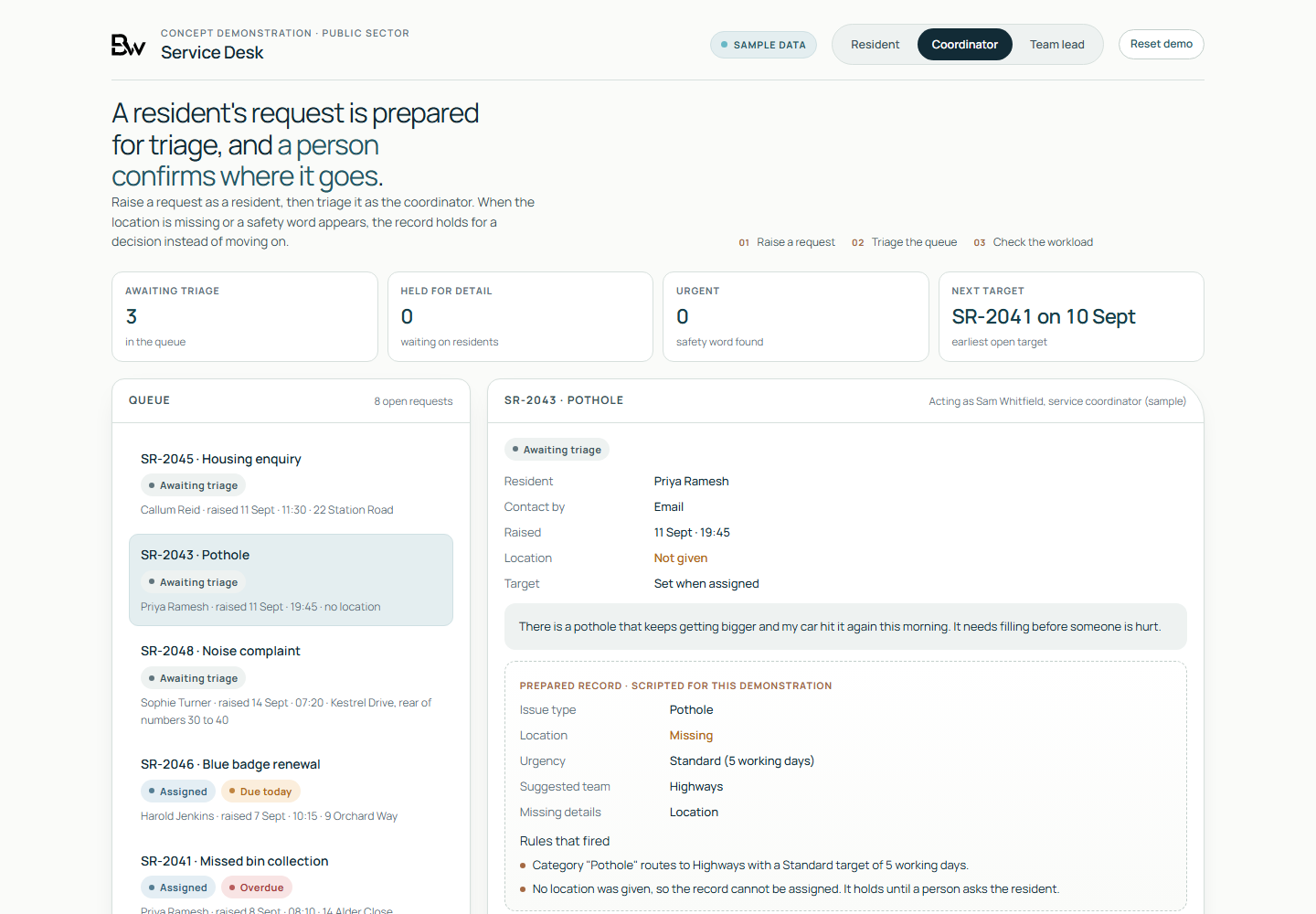
Working demo, on sample data
- A resident request raised, then triaged by the coordinator from a prepared record that shows the rule that fired.
- A request held when its location is missing, and a request that contains a safety word raised to Urgent and flagged to the team lead.
- The team lead's view of open, overdue and held requests against illustrative working-day targets you can change.
Worth asking first
- Which frameworks, libraries and runtimes does your system depend on, and when does support for each one end?
- When a critical or high-risk fix is released for one of them, who applies it, and within how many days?
- When was a backup of the system last restored, and how long did the restore take?
- Are the code repository, hosting account and domain registered to your organisation, or to the person who built the system?
- Has your supplier stated in writing the level of support it provides and the notice it will give before support ends?
Talk to us if
- Your developer or supplier is leaving, and the system has to keep running.
- The hosting account, domain or code repository is registered to someone outside your organisation.
- The system runs on a framework or runtime version that no longer receives security updates.
- Changes your team asked for have sat unmade for months.
- Nobody has restored a backup of the system to check that it works.
- A rule or standard has to reach a live system, such as electronic VAT invoicing or accessibility fixes to WCAG 2.2 AA.
Questions
Questions buyers ask
Do you provide 24/7 support?
No. Support runs in business hours, and the contract states the hours, the severity definitions and the response target for each. Before work starts we write down what happens out of hours. If your system needs round-the-clock cover, we set that out as a requirement for a supplier who staffs it.
Will you maintain a system another supplier built?
Yes, after a system takeover review. We review the code, hosting, access and dependencies first, and the review can conclude that the system should be rebuilt, replaced with a product or left with its current supplier. You receive the findings whichever way it goes.
Who owns the code, the hosting and the data?
The code sits in a repository your organisation controls, the hosting in a cloud account in your organisation's name, and the documentation with the code. For code we write, the contract assigns the intellectual property to you; for software another supplier built, ownership depends on your contract with them, and the takeover review checks it. We work through access you grant and can remove, and we keep a list of every credential we hold.
Do you run penetration tests?
No. We scan dependencies, apply security fixes and review code and configuration. When a system needs a penetration test, we point you to CREST's directory of accredited companies or, for public sector and critical national infrastructure systems, to the NCSC's CHECK scheme, and we prepare the system and its documentation for the test.
What happens if we end the arrangement?
The contract sets a notice period. During it we hand over the backlog, the runbook, the list of credentials to rotate and the state of every dependency, for whoever maintains the system next.
A takeover review comes first, and you keep it.
A system takeover review lists the accounts, components and risks in the software you rely on, and ranks what to fix first.
Request a system takeover review