

Free demo
Working demo
Every repair on one shared record
Open the Repairs Desk demoIndustry guide
The clock starts before the job does
Download the property and housing guide (PDF, 13 pages)Working demo
Approvals routed, with every decision owned
Open the Approvals demoProcesses accumulate exceptions faster than software absorbs them, leaving people to carry the difference.
What we do
Every case, job and request gets one record, with its owner, status and history.
If your team tracks cases, jobs or requests across a spreadsheet, a shared inbox and a whiteboard, the answer to what is open, who has it and when it is due depends on who you ask. If the process carries a legal deadline, a regulator's measure or an auditor's question, the history of one item has to be rebuilt from emails.
We build web applications around one process at a time: one record per case, job or request, with its owner, status, due date and full history, and the roles, approvals, schedules and reports around it.
We start with a working demo of your process on sample data, ship a first release your team uses, then extend it release by release. The code sits in your repository, the system runs in your cloud account and the documentation stays with your team from the first release.
Records, rotas and software purchases in official statistics
The regulator's completion measure counts only repairs completed during the year, so the cancelled and in-progress repairs above sit outside it; its figures come from 360 submissions by landlords with 1,000 or more homes. The care survey was voluntary, with 1,085 responses from registered managers and nominated individuals, and its publisher says its findings should not be used to determine planning for the adult social care sector as a whole. The breaches survey sampled 2,112 businesses and 1,085 charities between August and December 2025, and its results carry margins of error.
What we build and hand over
Each system is a web application your staff open in a browser, with access set by role and single sign-on where your accounts support it. Start with one process and add the others to the same system later.

Case and request management
Replace the spreadsheet and shared inbox that track your cases, jobs or requests with one record per item: an owner, a status, a due date and its full history. Give each team its own queue and each manager a view across all of them.
Includes
- Intake from a web form, a monitored mailbox or an API
- Permissions set by role, team and record type
- An audit trail of every change: who, what and when
- Team queues with ageing and overdue flags
- SAML or OpenID Connect single sign-on, with multi-factor sign-in enforced by your identity provider

Scheduling and field work
Plan visits, jobs and shifts against skills, travel time and availability, so the office and the person on the road work from one plan. Capture completion on a phone and keep a history of who attended what, and when.
Includes
- Allocation rules for skills, travel time, shift length and continuity
- Reallocation when someone is off, with affected visits listed for a person to decide
- A phone view for check-in, completion notes and photographs
- A dated record of who attended, when and for how long

Approvals and internal tools
Route purchases, expenses, changes and sign-offs to the right person by threshold, and keep a record of who decided what, and why. Give the team that maintains prices, cost centres or sites its own admin screens in the same system.
Includes
- Approval chains set by amount, cost centre and request type
- Delegation during absence and escalation of overdue items
- Holds for a missing receipt or a suspected duplicate
- A decision log with the approver, the time and the reason
- A file export or API feed to your finance system

Spreadsheet and legacy data migration
Move your records out of spreadsheets, desktop databases or an unsupported system, and clean them on the way. Reconcile counts and totals before anyone relies on the new system, and list every record that could not be matched for your team to decide.
Includes
- Field mapping from each source to the new data model
- Deduplication and cleansing rules your team approves
- A reconciliation report of counts and totals for sign-off
- An exceptions list of records that could not be matched
- A cut-over plan with a fallback to the old system

Operational reporting
Draw the counts, ages and exceptions managers need from the records the team works in, and retire the weekly report assembled by hand. Write down the definition of every measure, so two managers reading the same number read the same thing.
Includes
- Dashboards by team, status, age and owner inside the system
- Exception lists for overdue, unassigned and reopened items
- Scheduled exports for board and committee packs
- A read-only feed to the reporting tool you already use
- A written definition for every measure

Ownership and handover
Keep the code in your own repository, the system in your own cloud account and the documentation with your team from the first release. Hand over the repository, the accounts, the documentation and administrator access that your staff or another supplier would use to run the system and change it.
Includes
- Assignment of the intellectual property in the code we write
- A register of third-party components and their licences
- Architecture, data model and runbook documentation
- Administrator access transferred to named people in your team
- A recorded handover session
What you get
What one record makes possible
- See every open case, job or request with its owner, status and due date in one place.
- An auditor, a regulator or an ombudsman can be shown any item's dated history, taken from the record rather than rebuilt from emails.
- Your organisation holds the code, the data and the hosting account from the first release.
Before and after
One damp report, before and after
A fictional damp report, followed from the first conversation to the month-end count: first in a spreadsheet and a shared inbox, then in a system built around the regulations. Under the Hazards in Social Housing (Prescribed Requirements) (England) Regulations 2025, a landlord has 10 working days to investigate a potential significant hazard, counted from the day after it becomes aware of it. The government's guidance treats a landlord as aware when a tenant first mentions damp to a maintenance officer it employs.
Mentioned on a visit
Today: A tenant mentions damp to a maintenance officer who is there to fix a door. The officer writes it on the job sheet and emails the repairs inbox that evening.
Once it is built: The officer logs the concern on a phone before leaving. The record stores that day as the awareness date, separate from the date any job is created.
Logged and triaged
Today: The email is read the next morning and becomes a row in the repairs spreadsheet. The row carries the date it was typed, not the date of the conversation.
Once it is built: The report reaches the repairs queue with the household note attached. A report that mentions a vulnerable household member holds for a person to set the priority.
Investigation due
Today: The due date is counted by hand from the spreadsheet date, if anyone counts it.
Once it is built: The record counts the 10 working days from the day after awareness and shows the due date in the coordinator's queue.
No access
Today: The contractor finds nobody home and phones the office. The attempt is mentioned on a call and written down nowhere.
Once it is built: The contractor records the attempt, the channel used and the next slot offered on the job itself. The record keeps every attempt.
Closed and counted
Today: The row is marked done or deleted. A cancelled job leaves no trace in the month-end completion figure.
Once it is built: Closing the record needs a reason: completed, cancelled by the tenant, cancelled by the landlord or merged as a duplicate. The month-end report counts all four.
Fictional tenant, landlord and dates. In this first phase the periods apply to emergency hazards and, among significant hazards, to damp, mould and fungal growth. How they apply to your homes is for you and your advisers to decide; the property and housing guide sets out every period and where each clock starts. The Repairs Desk demo shows the shared record and the damp and mould hold on sample data; its priority windows are illustrative and do not apply these periods.
How it runs
Five stages from working demo to handover
- 01
Working demo of your process
Walk us through one process, its exceptions and a sample of its records with personal data removed. We build a working demo of it on sample data and review it with the people who do the work, including whether a product on the market would fit.
- 02
First release scope
Choose the part of the process that is useful on its own, write down what the first release leaves out, and set the acceptance tests your team will run before go-live.
- 03
Build and review cycles
Open each cycle's work on a staging copy with your users and decide what changes. We write automated tests alongside the code, check it against OWASP ASVS and WCAG 2.2 AA, and prepare the technical sections of your data protection impact assessment.
- 04
Migration and go-live
Load your cleaned records, sign off the reconciliation report and switch over with the old system held ready as a fallback. Backups run from the first day, and one restore is tested before go-live.
- 05
Handover
Take the repository, the cloud account, the documentation and administrator access into your team's hands, with a recorded handover session. Then run the system yourselves, pass it to another supplier or keep us on for changes and support.
Read and try
Read the research. Open the demo.
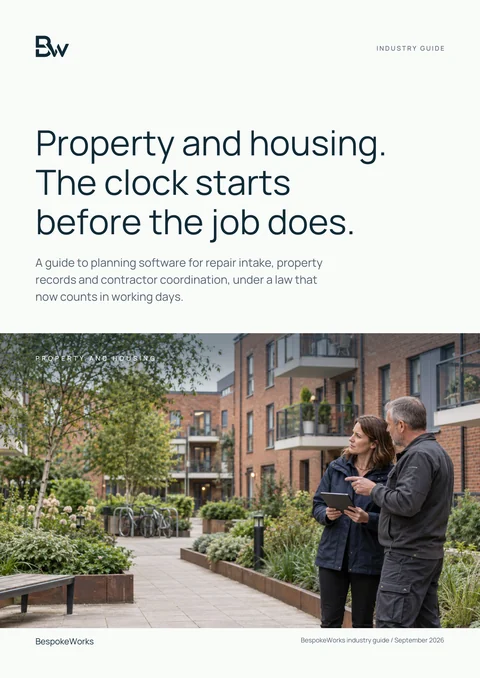
Industry guide
Property and housing: a practical technology guide
Read Awaab's Law as a set of records: every deadline, the day each clock starts, and what the government's guidance expects a landlord to be able to show when there is no access. The Repairs Desk demo shows one repair record shared by resident, coordinator and contractor on sample data, with illustrative priority windows rather than the statutory periods.
Download the property and housing guide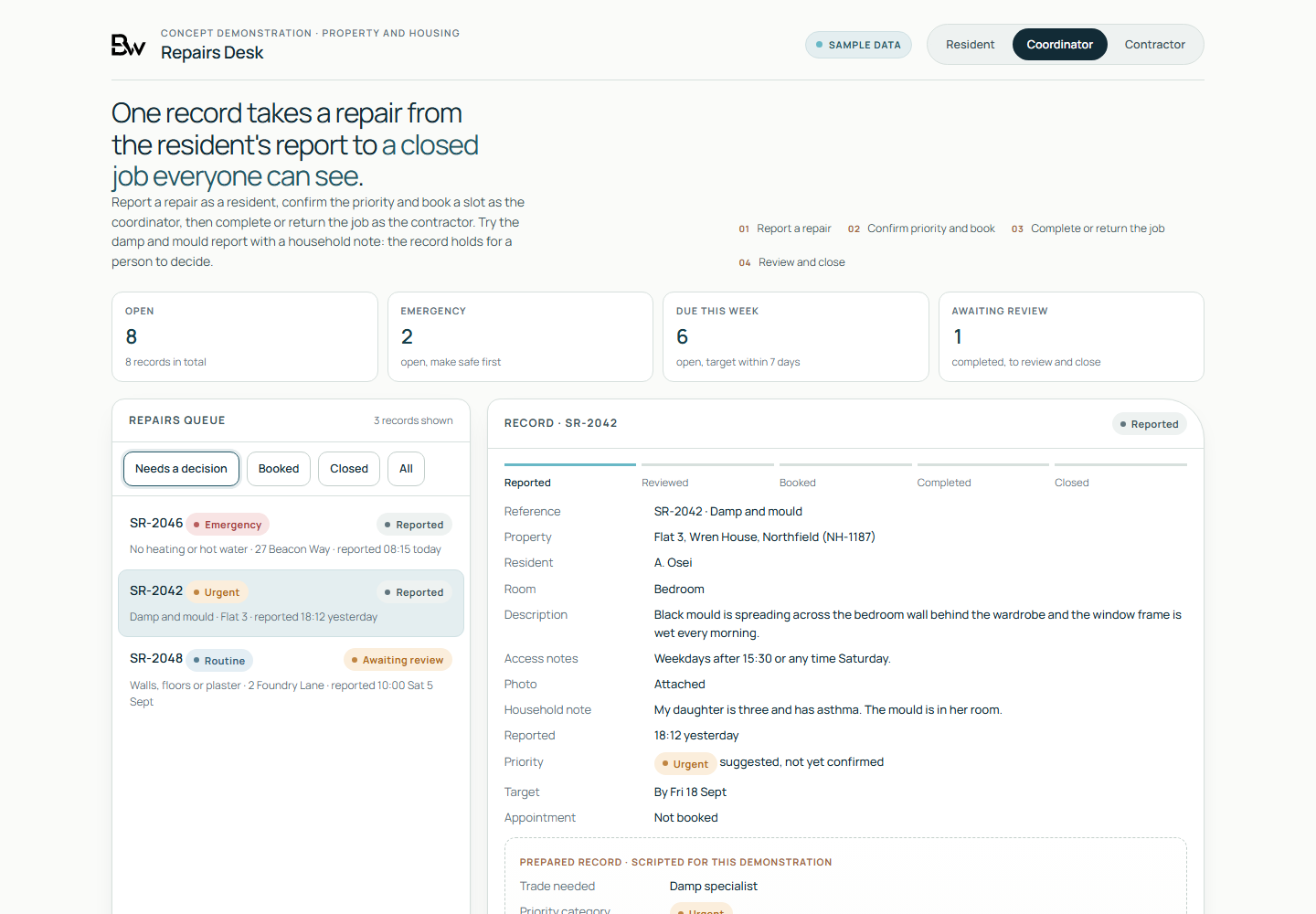
Working demo, on sample data
- One repair followed from the resident's report, through the coordinator, to the contractor's completion or return.
- A priority confirmed and a contractor slot booked on the same record.
- A damp and mould report with a household note held for a person to decide.
Worth asking first
- Which part of this process breaks first if the volume doubles?
- Who holds knowledge of the process that is written down nowhere?
- For any single case, could you show who changed it, when and why?
- Who owns the code, the data and the hosting account of the systems you run today?
- Which exceptions would a product have to handle before your team could use it?
Talk to us if
- Your team tracks cases, jobs or requests in a spreadsheet that several people edit at once.
- A shared inbox is the only record of who is handling what.
- The products you have trialled fit the common version of your process, but not its exceptions.
- A system you depend on runs on a desktop database, or on software its maker no longer supports.
- An auditor, a regulator or an ombudsman could ask for the full history of a single case.
- Managers rebuild the same weekly report by hand from several sources.
Questions
Questions buyers ask
When should we buy a product instead?
When a product fits your process with configuration alone, buy it: every customer shares its development cost. The working demo is where that question is answered, and its result can be a recommendation to buy a product or to change nothing.
Who owns the software you build?
You do. The code sits in a repository in your organisation's account and the system runs in a cloud account you own, from the first release. The intellectual property in the code we write is assigned to you, and a register lists every third-party component with its licence, since open-source components stay under their authors' licences.
Do you run a penetration test before go-live?
No. We check our code against OWASP ASVS during the build and write down what was checked. If your system needs a penetration test, commission one from a CREST-accredited company or, for public sector and critical national infrastructure systems, a company assured under the NCSC's CHECK scheme, and we work through its findings in the code we wrote.
Who is responsible for data protection?
You remain the controller of the personal data in the system, and we act as your processor, under UK GDPR Article 28 terms, whenever we handle that data while we build and support it. We prepare the technical sections of your data protection impact assessment: what is stored, where, who can see it and how long it is kept. The assessment and its sign-off stay with you and your advisers.
Which technology and hosting do you use?
We name the language, framework, database and hosting in the proposal for your system, and choose them so that your own staff or another supplier can maintain it. At its edges each system connects through documented APIs and webhooks, and signs staff in through SAML or OpenID Connect single sign-on to the accounts they already use. You choose the hosting region, and the proposal records it.
See your process working before you build it.
Walk us through one process and its exceptions, and we build a working demo of it on sample data for your team to try against its own cases.
Request a working demo