
Free demo
Working demo
Check a prepared record against its source notes, statement by statement.
Open the Notes to Record demoInsight report
Which routine work suits a fast model, and why the account a tool runs on matters.
Download What an answer costs (PDF, 17 pages)Industry guide
What the legal regulators have said about AI, and what the courts have done, with references.
Download the professional services guide (PDF, 13 pages)Make AI useful in the working day.
What we do
Learn on a task you actually need to do.
An AI licence does not give a team a reliable way to use it. People need to know which tasks suit an assistant, how to give it the right context and how to decide whether the result is useful.
We practise on everyday tasks such as emails, meetings, documents and research using your approved tools. Participants learn to structure a brief, improve an answer, verify it against the source and save a reusable method. Data protection, confidentiality and human review are part of every exercise.
The foundations course, part by part
Book the session on its own or with the clinic that follows it. Every part runs on the assistants your organisation has approved and on tasks your people bring from their own jobs.

AI foundations session
Work through emails, meeting notes, document summaries and research with your approved assistant. Learn when AI helps, when it needs more context and when to do the task another way.
- Choose suitable tasks and define what a useful result looks like
- Practise on approved business accounts with sample information
- Compare a quick draft with a source-grounded answer
- Refine tone, structure and level of detail
- Check understanding through a practical task
Briefing practice
Write a brief with context, a role, an example, constraints and a named output, then improve it from what comes back. Rewrite one brief from your own work until the answer can be checked.
- The five parts of a brief, applied to one task per participant
- Working from an approved source document rather than from memory
- Reading an answer for what the brief left out, then briefing again
- When to stop briefing and do the task by hand
- A before-and-after brief for each participant
Output checking practice
Check AI output against its source before anyone relies on it. Practise four checks on prepared drafts first, then on each participant's own.
- Citations and sources traced to the document they claim to come from
- Figures, dates and names that appear in no source
- Conditions written as decisions, and qualifications dropped from a summary
- Answers past a model's knowledge cut-off
- R (Ayinde) v London Borough of Haringey [2025] EWHC 1383 (Admin) as the worked example on invented citations
Data rules for AI tools
Confirm from your existing rules, before the session, which information never goes into an external tool, which approved route to use instead and whom to ask when unsure. Then teach those rules inside every exercise.
- Personal data, and special category data under UK GDPR Article 9
- Client-confidential, privileged and commercially sensitive material
- OFFICIAL-SENSITIVE information for public bodies, under the Government Security Classifications Policy
- Business accounts against personal logins, and the retention and training terms of the accounts you use
- A red, amber and green sheet drawn from your own data classes
Your reusable workplace toolkit
Turn successful exercises into instructions the team can use again, with examples and clear review steps.
- A prompt library organised by everyday task
- Reusable skills: task instructions, examples, boundaries and output formats
- A checking routine and an owner for each shared method
- Guidance written for your approved tools
Follow-up clinic
Bring back the tasks that did not work once people tried them on live work, and rework the brief, the check or the rule with the trainer.
- Tasks tried after the session, with what came back
- A reworked brief for each task brought
- Changes to the guide where a check or a rule did not hold
- A note of which roles would gain from role-specific AI training next
What you get
How each person briefs, checks and keeps data out
- A repeatable method for briefing, refining and checking AI-assisted work.
- Reusable prompts and task instructions for work the team actually does.
- A clear understanding of approved tools, permitted information and when to ask for help.
A sample
One brief, before and after checking
A specimen page in the format of the participant guide, on sample data: one task, the first brief, what came back, what the check found and the brief that replaced it.
Sample, on sample data
- Task
- Draft a reply to a customer whose order is four days past its promised delivery date, using the complaints policy and the order record.
- Data class
- Amber. The complaint names a customer, so it goes only into the assistant your organisation has approved, on a business account, and never into a personal login.
- First brief
- "Write a reply to this complaint." The complaint is pasted in. The policy and the order record are not.
- What came back
- A fluent, apologetic reply that quotes the order number, offers a £20 goodwill credit and promises delivery by Friday.
- What the check found
- Three factual statements, one supported. The order number matches the record. The policy offers no goodwill credit and the order record gives no new delivery date: the assistant supplied both.
- Revised brief
- Context: the complaint, the late-delivery section of the policy and the order record. Role: a customer service adviser replying for the company. Constraints: offer only what the policy states, give no date the order record does not contain, stay under 150 words. Example: one approved past reply. Output: a draft for the team lead, with each factual statement marked with its source.
- Sign-off
- The team lead checks each marked statement against the policy and the order record, sends the reply, and records the tool, the date and the reviewer.
Sample data. The customer, the order, the policy and the reply are invented for this page, and the example shows the method rather than any tool's actual output. In a session, each participant works on a task from their own job, within the data rules agreed beforehand.
How it runs
From intake to clinic
- 01
Intake
Find out which assistants people already use and on which accounts, which ones your organisation has approved, and which data rules apply. Each participant sends one task from their own job, describing rather than sending anything in a restricted class.
- 02
Preparation
Build the exercises from the tasks sent in, write your data rules into the session, and put sample data in place of anything a task describes from a restricted class.
- 03
Session
Show how an assistant produces an answer and where it fails, then practise briefing and checking on each participant's task. Send the guide and desk card afterwards, with each person's before-and-after brief.
- 04
Clinic
Rework the tasks that did not go well once people tried them on live work, and update the guide where a brief, a check or a rule did not hold.
Read and try
Read the research. Open the demo.
Insight report
What an answer costs
Read the section on what AI means for a business before the session: which routine work suits a fast model rather than a flagship, and why the account a tool runs on decides what happens to the information you put in.
Download What an answer costs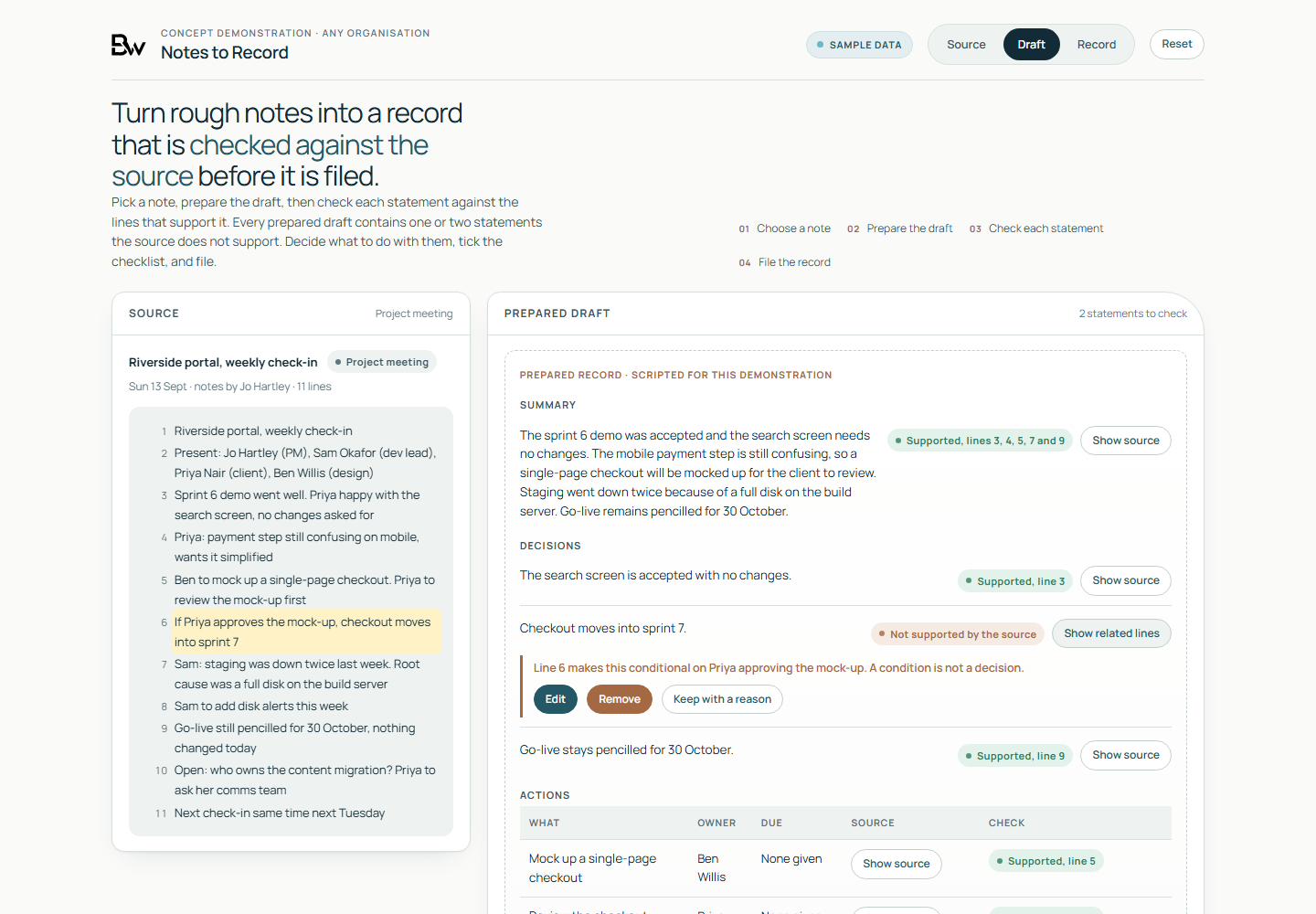
Working demo, on sample data
- Four sample notes, from a project meeting, a client call, a site visit and a supplier review, with numbered lines beside a prepared record.
- Statements the source does not support flagged for a decision: a condition written as a decision, a wrong owner, a date nobody gave.
- Filing held until each flag is edited, removed or kept with a reason and the demo's own four filing checks are ticked. The drafts are scripted and no language model runs.
Worth asking first
- Which everyday tasks would your team like to improve?
- Which AI tools and accounts are approved for the work?
- What information may the team use in exercises?
- How will participants check their answers and reuse the method?
Talk to us if
- People already use AI assistants at work without having seen how the tools fail.
- Your organisation has approved an assistant and wants it used on real work, within rules people know.
- A figure, date or citation in an AI-assisted draft reached a client, a board or a regulator unchecked.
- Your acceptable-use policy is written but untested on a live task.
- A mixed group, from the front desk to the directors, needs one starting point before role-specific training.
Questions
Questions buyers ask
Do people need technical experience?
No. Foundations is for employees who want to use AI in their working day. Developers and experienced users can move into a role-specific session.
Which tools do you teach?
We use the AI assistants your organisation has approved. Exercises follow your account settings and data rules, and the briefing and checking methods carry across tools.
Can we bring our own work?
Yes. We agree suitable examples beforehand and replace restricted information with sample material. Removing names alone does not necessarily make a document anonymous.
Can you help us create a custom skill or chatbot?
Yes. A scoped workshop can include building a starter with you, teaching your team to build and maintain it, or both. The purpose, platform, access and handover are agreed before the session.
Does training certify compliance?
No. Training helps staff apply your rules and recognise when to escalate. Your data protection lead or advisers review legal requirements and the way they apply to your organisation.
Leave with a method you can use tomorrow.
Tell us about the work your team does and the AI tools you use. We will shape the exercises around them.
Discuss workplace AI training