
Free demo
Working demo
Answers only from approved documents: the clause quoted with its source, or a plain 'not covered'.
Open the Knowledge Desk demoInsight report
What an answer costs: the energy, the people, and who pays.
Read the 2026 report (PDF, 17 pages)Industry guide
What the SRA, the Bar Standards Board and judicial guidance say about AI in professional work.
Download the professional services guide (PDF, 13 pages)AI features can get worse without anyone rewriting them.
What we do
Each AI feature does one task, shows where its answer came from and leaves the decision with a named person.
Where staff retype values from scanned forms, sort a shared inbox by hand each morning or search a policy library for one clause, AI can take on part of that work. The difficulty is evidence. An answer with no source cannot be checked, a hosted model can be updated or retired by its provider, and a draft sent without review still carries your organisation's name.
We build AI into your software as one component with a defined job: retrieval over your own documents, extraction from forms and letters, triage of incoming requests, or drafting from the record.
Each feature quotes or shows its input, holds anything that fails a check for a person, logs what it did, and is measured against a test set of your past cases before launch and after every model change. We name the model and where it runs, and the feature can be switched off without stopping the system around it.
AI at work: the 2026 public figures
The ONS figures come from the voluntary Business Insights and Conditions Survey, published as official statistics in development; they cover businesses with 10 or more employees, and the ONS states that the headline measure does not distinguish between light use, user-level use, and more embedded, production-level adoption. The DSIT figure is what organisations reported in a survey with fieldwork from August to December 2025, and its 24% is a share of the businesses using, adopting or considering AI, not of all businesses. The SRA figure counts reports received, not findings, and covers legal services only.
AI capabilities, each with one job
Each feature does one task inside your software, shows the input behind its output, and hands anything that fails a check to a person. Where a demo exists, the card links to it: working software on sample data, with the AI steps scripted so the review points are visible.
Answers from your own documents
Let staff ask questions of your approved policies, contracts and procedures and get the passage quoted with its source, or a plain 'not covered' when the documents are silent. Check what each person is allowed to see before anything is retrieved, and send gaps and conflicting clauses to the document owner.
Includes
- Retrieval-augmented generation (RAG) over your document store, indexed by section and version
- Sign-in through your existing single sign-on (SAML or OpenID Connect), with access checked on every passage retrieved
- A citation to the document, version and paragraph behind each answer
- A 'not covered' response, and a queue of unanswered questions for each document owner
- Where two documents both answer a question, both clauses quoted side by side for the owner to reconcile
Document and form extraction
Read invoices, referral forms, orders and letters into structured fields, with each value shown beside the text it came from for a person to confirm. Keep any value that fails a check out of your systems until a person confirms it, with the failed check named beside it.
Includes
- Text recognition (OCR) for scans and photographs, and parsing for PDFs and email
- Structured output validated against a JSON Schema for each document type
- Field checks against your own reference data, such as customer, supplier and product lists
- A queue of held values, each with the check it failed
- Confirmed values written to your case, order or finance system through its API
Triage and classification
Sort incoming requests by type, urgency and team, show the rule or example behind each suggestion, and leave the decision with the coordinator. Hold any request with a missing detail until a person supplies it, and mark any request containing a safety word as urgent for the team lead.
Includes
- Categories, urgency levels and routing rules written with your team and readable by them
- Labelled examples from your own past requests, stored beside the rules
- The reason for each suggestion shown on the record
- Hold rules for missing details, and a safety word list that raises urgency, both set by your team
- Coordinator overrides logged and added to the next test run
Drafting under review
Draft replies, case notes, minutes and summaries from the record, marked as drafts until a named person approves them. Link each statement to the note or message it came from, and flag any statement the check cannot link to a source.
Includes
- Your templates, tone and required wording built into each type of draft
- Links from each statement in the draft back to the source note or message
- Statements with no linked source flagged before approval
- An approval step that records the reviewer's name and the time
- A log of the edits made between the draft and the approved version
Evaluation and monitoring
Build a test set from your own past cases before launch, measure how often the feature is right and how it fails, and rerun it whenever the model, the prompt or the documents change. Agree the stop condition before go-live, and review a sample of live outputs after it.
Includes
- A test set of anonymised past cases, with the correct answer agreed by your team
- Accuracy, precision and recall for each category, and a written list of failure types
- Regression runs on every change of model version, prompt or retrieval settings
- A sample of live outputs reviewed on a schedule you set
- A stop condition, and a switch that turns the feature off without stopping the system
Model choice, hosting and security
Choose between hosted models from the major AI providers and open-weight models run on infrastructure you control, on data retention, processing location, training use and cost per request. Review the design and code for prompt injection and data leakage before launch.
Includes
- A written comparison of model options on retention terms, processing location and use of your data for training
- Routing that sends routine work to a small model and hard cases to a larger one
- Checks against the OWASP Top 10 for LLM Applications, including prompt injection and sensitive information disclosure
- Controls mapped to DSIT's Code of Practice for the Cyber Security of AI
- A running-cost estimate per request at your expected volume
What you get
What each feature quotes, holds and is tested on
- Answer staff questions from approved documents, with the paragraph quoted and a plain 'not covered' when the documents are silent.
- Forms, letters and messages become checked fields and routed requests, while any value that fails a check is held for a person to confirm.
- You know how often each AI feature is right on your cases, and we rerun the test on every model, prompt or document change.
From the publication
What an answer costs to run
Our September 2026 report tests four common beliefs about AI against primary sources. Four of its sections bear directly on building an AI feature: what one answer takes, where the electricity goes, how a provider counts its emissions, and what a business can choose.
- 01
What one answer takes
An ordinary exchange, five hundred words in and three hundred back, comes to around 320 trillion operations on the report's stated assumptions. No vendor publishes what a single frontier answer costs to produce, so the report shows its working for anyone to check.
- 02
Training or use
The large frontier training runs since 2020, added together, come to about 1.7 terawatt-hours on the International Energy Agency's order-of-magnitude estimate: about a tenth of one per cent of what data centres used over those same years. The weight sits on use, which grows with every user and is the part a business chooses.
- 03
Two ways of counting emissions
Alphabet's own 2026 environmental report gives two figures for Google's 2025 electricity emissions: 15.1 million tonnes, location-based, for what the grids it drew from emitted, and 2.8 million tonnes, market-based, as Google reports it. When you choose a model provider, ask for the location-based figure for the region serving your account.
- 04
What this means for a business
Of the measurements the report charts, five seconds of generated video uses around 60,000 times the energy of a quick answer from a small open model. Send routine work to the smallest model that does the job, and keep the thinking mode, at about thirteen times a plain answer, for hard problems.
The 60,000-to-1 spread compares published measurements: a small open model measured by the ML.Energy team at the University of Michigan, and a five-second generated video measured for MIT Technology Review. The report cautions that nearly every public measurement of video energy comes from one research group and has not been repeated. Figures a company reports about itself are labelled as such in the report, which lists every source by section.
How it runs
How an AI feature is built
- 01
Define the task
Write down what the feature does and never does, what a correct output looks like, and what a wrong one would cost and who would notice. Collect the past cases that will become the test set.
- 02
Prototype on your own documents
Build a working version against a sample of your documents or requests, with the evaluation running from the start, so its answers, its sources and its failures are visible together.
- 03
Design the review step
Decide where a person confirms, corrects or rejects each output, what is held automatically, and how each correction is recorded and added to the next test run.
- 04
Launch with a stop condition
Deploy with logging, monitoring and the agreed stop condition, then rerun the test set on every change of model, prompt or documents. The feature can be turned off without stopping the system around it.
Read and try
Read the research. Open the demo.

Insight report
When can you trust AI?Insight report
When can you trust AI?
It sets out what evidence would justify relying on an AI-assisted result: tracing each answer to its source, testing on your own cases and a named person who checks, the question every review step and test set on this page is built to answer.
Read the report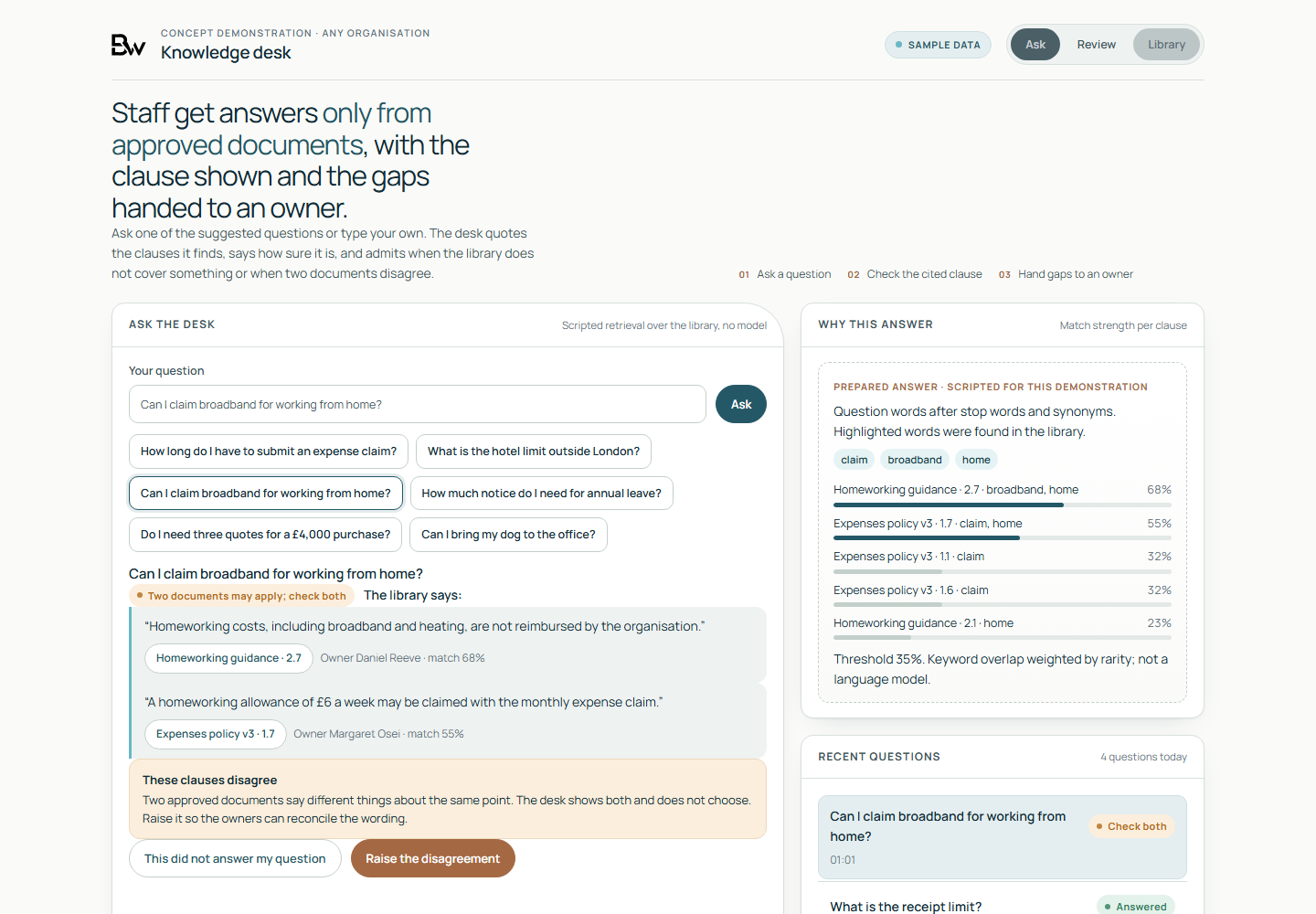
Working demo, on sample data
- A question about homeworking costs answered with two quoted clauses from different sample policies, and a notice that they disagree.
- A plain 'not covered' when the sample library is silent, with the question added to a review queue for a suggested document owner.
- The Ask, Review and Library views. Answers are assembled by scripted keyword matching over sample policies: no language model runs and nothing is sent.
Worth asking first
- What would a wrong answer cost here, and who would notice it first?
- Which of your documents are approved sources, and who owns each one?
- Has a data protection impact assessment been written for this use? The ICO's guidance on AI and data protection says that in the vast majority of cases, using AI to process personal data will trigger the legal requirement for one.
- Would the feature make a significant decision about a person based solely on automated processing, which brings in the safeguards in UK GDPR Articles 22A to 22D?
- How would you know if quality drifted after the provider updated the model?
Talk to us if
- Staff search a policy library by hand for one clause, and two documents give different answers.
- Your team retypes values from scanned forms, PDFs or emails into a case, order or finance system.
- A shared inbox or request queue is sorted by hand before anyone can act on it.
- You have an AI pilot that impressed in a demonstration and has no test set or stop condition.
- You need to choose between a hosted model and one run on your own infrastructure, with retention terms and running costs side by side.
- Your regulator expects AI-assisted work to be checked, as the SRA's August 2026 warning notice does for case law authorities cited to a court, and you need a record of who checked what.
Questions
Questions buyers ask
Which AI models do you use?
The one that fits the task, the data and the budget. We compare hosted models from the major AI providers with open-weight models run on infrastructure you control, on retention terms, processing location, use of your data for training and cost per request, and write the comparison down. We hold no reseller or partner arrangement with any model provider.
Can you guarantee the answers are correct?
No. Language models make mistakes, and they do not report a calibrated confidence by default. What we can show is how often a feature was right on a test set of your past cases, how it failed, and where a person reviews each output. When the documents do not cover a question, the feature is built to say so and quote nothing, and the test set measures how often it does.
Does the AI make decisions about people?
In what we build, the feature suggests, extracts or drafts, and a named person decides. Where a design would make a significant decision about a person based solely on automated processing, UK GDPR Articles 22A to 22D, inserted by the Data (Use and Access) Act 2025, set the conditions and safeguards. We describe the design and its controls; your data protection lead and legal advisers sign off.
Do you run penetration tests or AI red teaming?
No. As part of the build we review the design and code against the OWASP Top 10 for LLM Applications, including prompt injection and sensitive information disclosure. That is a design and code review, not a penetration test. Where a system needs one, our Cyber security page lists the public schemes for finding a tester; we fix what the test finds in systems we build.
What does it cost to run?
That depends on volume, document size and the model chosen. Before we build, we estimate the cost per request at your expected volume and show where routing routine work to a smaller model changes it. Our report What an answer costs explains why the spread between models is so wide.
We test the feature against your own past cases.
Describe one task and the documents or requests behind it. The working demo, on sample data, shows what a feature would quote, what it would hold and what it would hand to a person.
Request an AI feature demo